Back
TikTok ad account suspended? Learn the 7 most common causes, the official appeal steps, and how to protect your remaining ad budget from being locked.
TikTok Ads
A TikTok ad account suspended notice means every campaign in that account stops at once, and you can no longer create, edit, or pay for ads until TikTok lifts it. For a brand spending daily on TikTok, that can mean lost sales within hours.
The bigger problem is that the remaining balance often stays locked inside the suspended account while you wait, and the learning your campaigns built up is interrupted.
The good news: most suspensions come from a handful of fixable causes, and TikTok gives advertisers 180 days to appeal. This guide covers why TikTok ad accounts get suspended, the official appeal steps, how to protect your budget, and a checklist to keep your account healthy.

What does it mean when a TikTok ad account is suspended?
A suspension means TikTok has paused your access to advertising because its review systems detected a policy violation, a billing problem, or behavior that looks risky. It is usually triggered automatically, and in severe or repeated cases it can become permanent.
While your account is suspended:
All running campaigns stop delivering.
You cannot create, edit, or launch new ads.
Billing functions and account information are locked.
The only way back is through TikTok's review or appeal process.
A suspension is different from a rejected ad. A rejection affects one ad and you can edit and resubmit it; a suspension affects the whole account. If your problem is single ads being turned down, see why TikTok ads get rejected and how to fix them instead.
The damage also lasts beyond the downtime. When campaigns restart, the algorithm often has to relearn, so advertisers usually need extra time and budget to get back to their previous cost per result.
7 common reasons TikTok ad accounts get suspended (and how to fix each)
Most suspensions fall into one of the seven categories below. Check the notification in Ads Manager first, then match it to the right cause before you change anything.
1. Advertising policy violations
Repeated policy violations are the most common trigger. This includes prohibited or restricted products, exaggerated claims, misleading before-and-after content, adult themes, and copyrighted music or footage.
Signs: several ads rejected for "Policy Violation" before the suspension.
Fix: remove or reword risky claims, replace unlicensed audio, and check every creative against TikTok's Advertising Policies. Ads that look native and realistic are flagged far less often; this TikTok ads creative playbook shows what that looks like in practice.
Rules also differ by country. Products allowed in one market can be restricted in another, which is a frequent cause of TikTok ad account suspensions in METAP.
2. Misleading or broken landing pages
TikTok keeps reviewing your landing page after an ad is approved, so a page that changes or does not match the ad can lead to a suspension weeks later.
Signs: ads rejected for "Misleading Destination", landing page errors, or unexpected redirects.
Fix: make sure the page sells the same product at the same price as the ad, add visible Privacy Policy, Contact, and Return Policy pages, and avoid link shorteners or redirect chains.
3. Payment and billing issues
Failed payments, chargebacks, and mismatched billing details lower TikTok's trust in your account.
Signs: "Payment failed" or "Billing error" notices, with ads stopping right after.
Fix: settle any unpaid balance, use a verified payment method in your business's name, and make sure billing details match the account. Then submit an appeal.
4. Suspicious account behavior
TikTok's systems watch for patterns that resemble fraud, even when the advertiser is legitimate. Sudden spend spikes, logins from many locations, and frequent restructuring are common triggers.
Signs: a new account suspended right after its first ads, or a suspension right after a big budget jump.
Fix: log in from stable devices and locations, avoid low-quality VPNs or proxies, and raise budgets gradually. Follow a structured TikTok ads scaling strategy instead of doubling spend overnight.
5. Links to a previously suspended account
TikTok connects accounts through shared details such as payment cards, emails, devices, domains, and Business Centers. An account linked to a banned one can be suspended even if it never broke a rule itself.
Signs: a message saying your account is associated with a previously suspended account.
Fix: if this is a mistake, appeal with proof that the businesses are independent. Do not try to get around a ban by opening new accounts with fresh details; TikTok treats this as circumventing its systems, and it usually leads to wider enforcement.
6. Missing or incorrect business verification
TikTok may ask for a business license, tax information, or ID. Missing or mismatched documents can stop an account before it runs any ads.
Signs: "Please verify your business information" or "Verification pending".
Fix: upload valid documents that match the account's business name and address. Once verification passes, access is often restored automatically.
7. A pattern of repeated minor issues
Many rejected ads, user reports, or small violations add up, even if no single one is serious.
Signs: warning notifications, more frequent rejections, or delivery dropping before the suspension.
Fix: pause or fix rejected ads quickly, and keep a clean record for the following weeks so the account rebuilds trust.
How to appeal a suspended TikTok ad account
You can appeal through a support ticket in TikTok Ads Manager, and you must do it within 180 days of the suspension or the appeal will not be reviewed. Fix the root cause first; an appeal that only asks for reinstatement rarely works.
Step 1: Identify the exact reason
Read the suspension notice in Ads Manager and the email TikTok sent. Knowing the cause tells you what to fix and what evidence to attach.
Step 2: Fix the issue and prepare evidence
Correct the creatives, landing page, billing, or verification problem before you submit. Depending on the case, prepare:
Business license or ID documents
Screenshots of the corrected ads and landing pages
Payment records or billing statements
A short, factual statement of what happened and what you changed
Step 3: Submit the appeal in Ads Manager
According to the TikTok Business Help Center, the steps are:
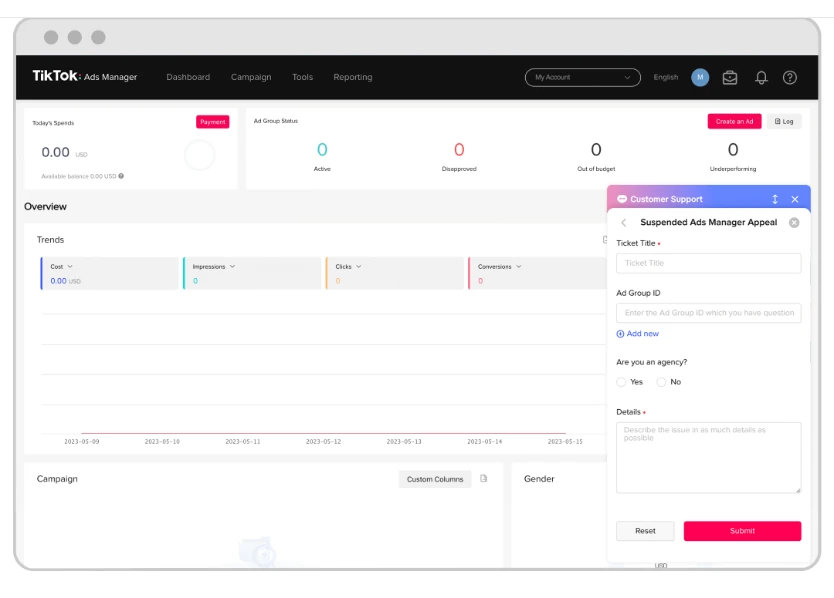
Sign in to TikTok Ads Manager with the suspended account.
Click the ? Help icon.
In Ad Assistant, click Submit ticket.
Under Issue Category, choose Account/Ad Review.
Choose Account Review.
Choose Account Suspension Appeal.
Describe your case and attach your evidence.
Click Submit.
Step 4: Wait for the review
TikTok usually replies by email within two business days. While you wait:
Submit only one appeal per incident. Duplicate appeals slow the review down.
Do not create new ad accounts. TikTok advises against it during a review, and it can count against you.
What if your appeal is rejected?
Read the reason in the reply, fix anything still outstanding, and appeal again with stronger evidence while you are still inside the 180-day window. If your account is managed through an official TikTok agency, the agency can often help clarify the reason and prepare the case.
The hidden cost: your budget can get locked
The biggest financial risk of a suspension is the balance left in the account. While the appeal is pending, that money cannot be spent, moved, or reinvested, and an appeal may take several rounds.
For advertisers who top up large amounts, this turns an operational problem into a cash-flow problem:
Revenue from paused campaigns stops.
Funds that should be scaling winning ads sit idle.
Restarting later costs extra while campaigns relearn.
How to reduce the impact on your budget
Top up in smaller amounts more often instead of loading a large balance at once.
Spread spend across accounts in a properly structured Business Center, so one suspension does not stop everything.
Run on an agency ad account. Many advertisers use a TikTok agency ad account for faster support and more flexible fund management.
With Ecomdy agency accounts, advertisers can request a refund of the remaining balance of a suspended ad account back to their Ecomdy Wallet, so the funds are not stuck while the case is handled.
TikTok ad account suspension prevention checklist
Prevention comes down to consistent, transparent account behavior. Use this checklist before launch and review it every month.
Policy and creative
Review TikTok's Advertising Policies and policy updates regularly.
Avoid absolute or exaggerated claims ("guaranteed", "cure", "#1").
Use only music and footage you have rights to.
Check country-specific rules before targeting a new market.
Landing page
Match product, price, and offer to the ad.
Show Privacy Policy, Contact, Shipping, and Return Policy pages.
Use direct URLs, with no shorteners or redirect chains.
Payment and verification
Use a verified payment method in the business's name.
Keep billing name and address consistent with the account.
Complete business verification with matching documents.
Security and behavior
Turn on two-factor authentication for every user.
Log in from stable devices and locations.
Audit Business Center access and remove people who no longer need it.
Scale budgets gradually and keep daily spend patterns steady.
Monitoring
Check notifications and rejected ads in Ads Manager weekly.
Fix warnings and billing errors immediately.
Keep records of past appeals and communication with TikTok.
FAQ
How long does a TikTok ad account suspension last?
It lasts until TikTok lifts it after a review or a successful appeal. Appeal replies usually arrive within two business days, but cases needing extra documents can take longer. Serious or repeated violations can lead to a permanent ban.
How long do I have to appeal?
You have 180 days from the suspension date. After that, TikTok will not review the appeal.
Can I create a new ad account while my appeal is under review?
No. TikTok advises against creating new ad accounts during a review, and doing so can hurt the appeal or get the new account suspended too.
Will I lose the money left in a suspended account?
The balance is usually locked while the account is suspended. With an Ecomdy agency account, your Ecomdy account manager can help you review the options for any remaining balance, including a refund request to your Ecomdy Wallet where eligible.
Is an ad account suspension the same as a TikTok account ban?
No. An ad account suspension affects your advertising in Ads Manager. Your TikTok profile or TikTok Shop can be restricted separately; this guide on what to do when your TikTok account is suspended covers those cases.
Conclusion
A suspended TikTok ad account is rarely the end of your advertising. Find the exact cause, fix it, and appeal once with clear evidence within the 180-day window, and many accounts can be restored.
The advertisers who scale steadily treat compliance as part of their system: native creatives, honest landing pages, stable payments and logins, gradual budget growth, and a plan for protecting their funds if something goes wrong.
As an official TikTok agency, Ecomdy helps advertisers stay compliant, handle suspension cases, and recover remaining budget from suspended accounts. Open an Ecomdy agency account to run TikTok Ads with dedicated support and more control over your budget.