Back
Learn the exact steps sellers need to qualify for Back to School 2026 subsidy and coupons on TikTok Shop, plus tips to keep campaigns stable.
TikTok Shop

Back to School is one of the biggest traffic windows of the year on TikTok Shop, but subsidy and coupon eligibility isn't automatic. Sellers who skip even one setup step can watch a competitor's listing get boosted traffic while theirs sits flat. Miss the window entirely, and there is no way to "catch up" once the sale has started, since TikTok evaluates eligibility based on account setup done in advance.
This checklist breaks down exactly what to configure before the sale goes live, plus how to keep a campaign stable once traffic starts spiking.
Why Back to School 2026 Matters for TikTok Shop Sellers
Back to School sits right in the middle of the platform's seasonal calendar, between summer clearance and the Q4 holiday rush. For sellers running print-on-demand or dropshipping catalogs on TikTok Shop US, this period is a chance to test which SKUs can carry heavier ad spend before the bigger November-December push.
The subsidy and coupon program is TikTok's way of rewarding sellers who are properly set up for the sale - not a blanket discount applied to every shop. Sellers who complete the requirements below get their eligible products included in the platform-wide coupon and subsidy pool, which typically means more visibility during the event without extra manual bidding.
3 Setup Steps Sellers Cannot Skip
These three steps determine whether your registered products actually receive Back to School subsidy and coupon support. Complete all three before the event window opens - partial setup usually means partial (or zero) eligibility.
Set GMV Max for Every Registered Product
Every product registered for the Back to School event needs an active GMV Max campaign, not just your best sellers. Leaving even a few registered SKUs without a campaign can affect how the whole batch is evaluated for the sale.
Two adjustments make this step run smoother:
Split out your Hero SKU into its own dedicated campaign so lower-performing products don't dilute its budget and ROI target.
Group SKUs with similar ROI into the same campaign, since products with wildly different margins pulling against one shared budget tends to confuse the algorithm's optimization signal.
If you haven't reviewed your product mix recently, this is also a good moment to revisit your Hero SKU strategy before locking in campaign structure for the event.
Increase Ad Budget by 30–40%
Back to School traffic arrives in a short window, and a budget increase of 30–40% above your normal daily spend is what most sellers need to actually capture it instead of running out of budget mid-day.
Watch daily spend closely once the event starts. If a campaign is using more than 80% of its daily budget, raise the budget by another 10–30%, or switch on Auto Budget so the system can adjust without waiting for a manual change. Running out of budget by early afternoon on a peak day means missing the traffic spike entirely, and TikTok doesn't retroactively credit that lost exposure.
Activate c
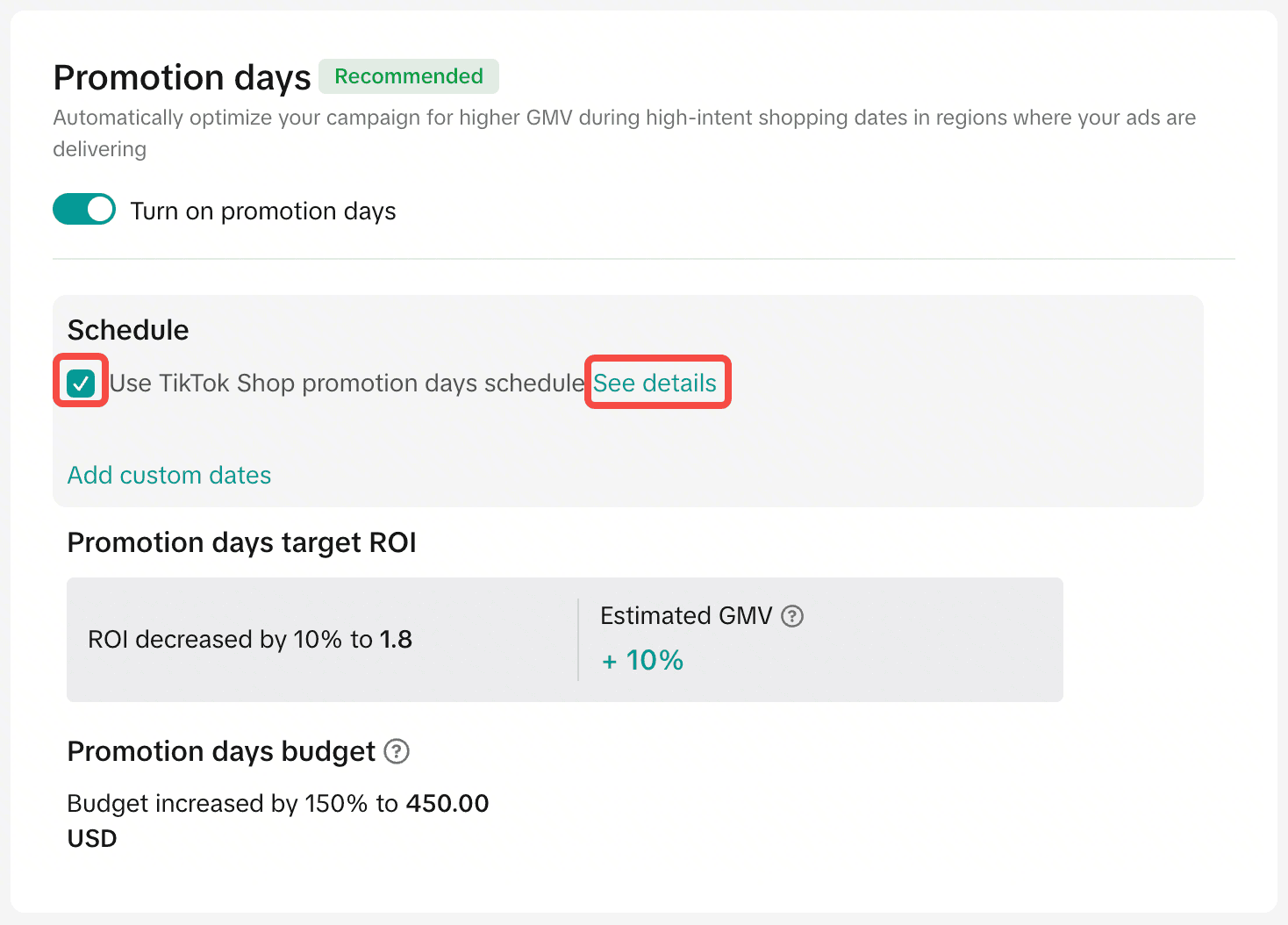
Promo Day needs to be active and confirmed inside the official Back to School event window — this is easy to overlook if a shop is also running its own separate promotions. Double-check that Promo Days show as active in Seller Center before the event starts, not just scheduled.
If your shop runs sales outside the platform's official calendar (a private flash sale, a brand anniversary discount), use the custom schedule option rather than letting it overlap with Promo Day settings, which can cause conflicting discount rules on the same listing. For the exact configuration steps, TikTok's own Seller University walks through Promo Day setup in more detail.
4 Tips to Keep Your Campaign Stable Once the Sale Starts
Qualifying for subsidy is only half the job - the campaign still needs to hold up once real traffic hits it. These four areas are where most Back to School campaigns lose momentum mid-event.
ROI target: Lower your target ROI by roughly 20%, or leave it on the system-recommended setting, since a target that's too aggressive during a traffic spike restricts delivery instead of scaling it. Whichever target you land on, avoid changing it more than once per day - frequent adjustments reset the algorithm's learning and tend to hurt performance more than they help.
Store operations: Keep enough stock on hand for your Hero SKU specifically, since this is the product most likely to see a sudden spike in orders. Turn on out-of-stock alerts, and keep an eye on your SLA (shipping response time) and cancellation rate - both directly affect how much organic and paid traffic TikTok routes to your shop, an important part of your overall Shop Performance Score.
Fresh creative: Add new video content daily, or every other day at minimum, during peak days of the event. Creative fatigue sets in faster during high-traffic periods, and a budget increase without fresh assets to match it usually just raises cost per result instead of driving more sales.
Pricing and promotions: Lock in vouchers, bundle pricing, and free shipping thresholds exactly as planned in your campaign calendar. Adjusting a promotion mid-event, even by a small margin, can trigger listing review delays right when traffic is highest - the worst possible timing for a pricing change.
[ẢNH: TikTok Shop seller checking GMV Max campaign dashboard during sale]
Bringing It Together
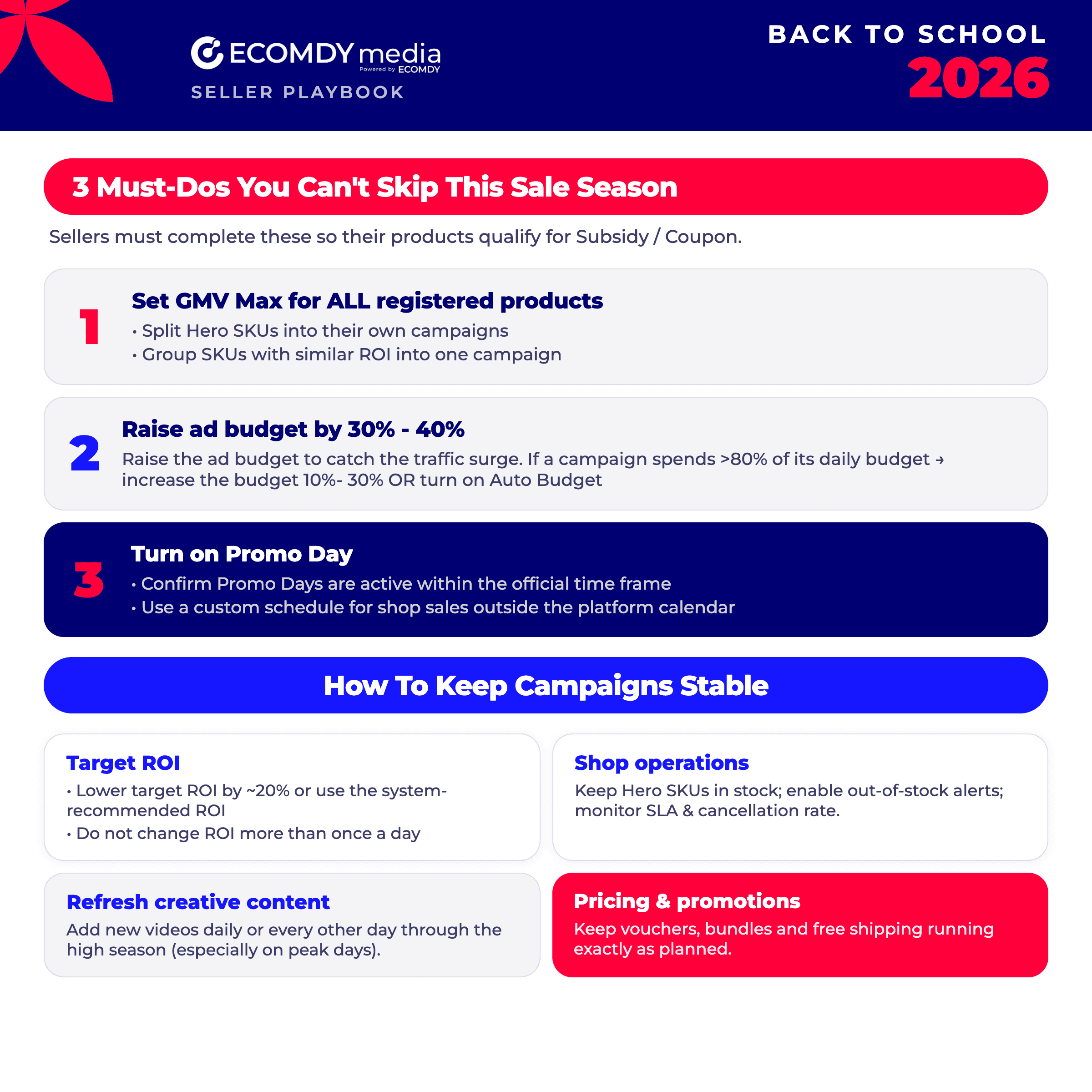
Back to School subsidy and coupon eligibility comes down to three setup steps done correctly in advance - full GMV Max coverage, a properly sized budget increase, and an active Promo Day - followed by close monitoring of ROI, stock, creative, and pricing once the event goes live. Sellers who treat this as a one-time setup instead of an ongoing checklist tend to lose momentum by day two or three of the sale.
For a broader view of how to structure a full sale-season campaign beyond just Back to School, this mega sale GMV strategy guide and this breakdown of what to do before, during, and after a mega sale are worth reviewing alongside this checklist. For a deeper technical refresher on the campaign type itself, see this complete guide to GMV Max and these GMV Max best practices.
Every shop's product mix, margins, and current ROI baseline are different, so the exact budget and target numbers above are a starting point, not a fixed formula. If you'd like a second set of eyes on your specific setup before the event window opens, reach out to Ecomdy for a 1:1 consultation.
FAQ
Do I need to register every product for the subsidy program, or just my top sellers? Only products you've registered for the Back to School event need GMV Max active, but leaving any registered product without a campaign can affect how the batch is evaluated, so it's safer to cover the full registered list rather than a partial selection.
What happens if I increase my budget too late in the event? A late budget increase can help for the remaining days, but it won't recover traffic already lost on days when the campaign ran out of budget early - this is why the 30–40% increase should be planned before the event starts, not adjusted reactively.
Can I run my own store promotion alongside Promo Day? Yes, as long as it's set on a custom schedule outside the official Promo Day window. Overlapping the two can create conflicting discount rules on the same product listing.
How often should I refresh creative during the sale? Daily is ideal during peak days; every other day is the minimum to avoid creative fatigue while traffic is elevated.